
Proxy Servers vs VPNs for Remote Connections: 2026
TL;DR: Choose a properly configured VPN for encrypted access to private company resources. Choose a proxy for application-specific routing or regional website testing. A proxy alone does not necessarily encrypt traffic or grant private-network access.
For remote teams, the key distinction is the job each connection must do. An employee opening an internal file share needs authorized access to the company network. A tester checking regional prices needs a suitable outbound IP. Compare traffic coverage, security controls, performance, and costs against those separate requirements.
Introduction to Proxy Servers and VPNs
A proxy forwards requests from configured applications, while a VPN encrypts traffic routed between a device and its VPN gateway. These tools solve different problems. A browser proxy does not automatically cover other applications. A VPN can support private-network access, but its actual coverage depends on routing rules and gateway permissions.
Some proxies also cache content. They can serve reusable files locally rather than download them again from the origin. Repeated requests for cacheable training images, for example, can use less upstream bandwidth.
Those savings require a cache hit. Personalized pages and content marked noncacheable generally cannot benefit from shared caching. Neither can HTTPS content tunneled without inspection. Before forecasting bandwidth savings, confirm whether the service includes a cache or simply forwards connections.
How Proxy Servers Work
A proxy relays configured application requests to destination servers, which generally see the proxy’s exit IP instead of the employee’s public IP. Applications outside that configuration may still connect directly. Changing the visible IP does not, by itself, encrypt traffic. Check both the proxy protocol and the destination’s use of HTTPS.
An HTTP proxy handles HTTP requests and can tunnel HTTPS connections using CONNECT. In a standard HTTPS tunnel, TLS encryption remains between the application and destination. Inspecting that content requires a separate interception setup.
SOCKS5 forwards supported application connections but adds no encryption itself. EProxies supports HTTP(S) and SOCKS5; select the protocol your application supports rather than assuming they provide identical protections.
Test each application separately. Check where DNS queries go and whether requests connect directly after a proxy failure. A successful browser test does not prove that email clients or background updates follow the same route.
How VPNs Work
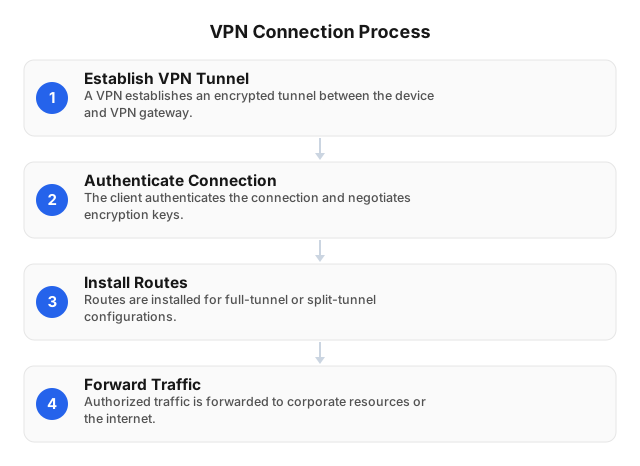
A VPN builds an encrypted tunnel from an employee’s device to a VPN gateway. The gateway then forwards permitted traffic to internal services or the internet. Tunnel encryption ends at the gateway. HTTPS or another secure application protocol must protect the onward connection; the VPN does not encrypt every part of the journey.
The client authenticates, negotiates encryption keys, and installs routing rules. Full-tunnel configurations send internet traffic through the gateway. Split tunneling sends only selected destinations through it. Internet services see the gateway’s public IP for tunneled requests.
Check internal DNS resolution and behavior after a connection drops. If sensitive requests must never travel directly, test that requirement explicitly. Authenticating the device also does not grant permission to every application behind the gateway.
Security Features: Proxy Servers vs VPNs
A properly configured enterprise VPN is usually the better fit for encrypted access to private company systems. Basic forwarding proxies handle selected application connections instead. HTTP and SOCKS5 do not inherently encrypt those connections, although HTTPS still protects application content. Neither approach replaces identity checks, device security, or limits on resource access.
| Security control | Proxy servers | Enterprise VPNs |
|---|---|---|
| Traffic coverage | Configured applications; other traffic may connect directly | Full-tunnel routing covers routed device traffic; split tunneling excludes selected routes |
| Identity controls | Credentials can authenticate proxy access but do not establish device health | Select a deployment with identity integration, MFA, and device checks |
| Private-resource access | Requires a gateway explicitly configured for private services | Can provide access to authorized internal services |
| Operator visibility | Operator can observe connection metadata | Gateway operator can observe connection metadata |
For administrators, restrict VPN access by role and network segment. A valid tunnel should not let a payroll user reach server-management interfaces. Encryption protects the connection; permissions limit what someone can do through it.
Performance Considerations for Remote Connections
Neither proxies nor VPNs are inherently faster across every workload. Route length, gateway load, destination behavior, and device processing can all affect results. A residential proxy test against a stable endpoint does not predict performance on a busy website. Compare the same applications, destinations, and employee locations before choosing a setup.
Basic proxy forwarding adds no tunnel encryption itself. That can reduce processing work compared with an encrypted tunnel, but distant or overloaded exits can erase the advantage. HTTPS still requires encryption work at the application level.
Use a repeatable test:
- For remote desktops, measure input delay, jitter, and packet loss.
- For browser applications, measure page-load times and login reliability.
- Repeat tests during peak team usage.
- Confirm the actual route; proxy exceptions or split tunneling can change what you are measuring.
Record failed requests alongside successful ones. Fast responses are not useful if employees must repeatedly retry an operation.
Cost Implications of Using Proxy Servers and VPNs
Proxy budgets commonly depend on traffic, IP addresses, or subscription plans. Enterprise VPN budgets depend on licensing, gateways, support, and administration. Compare the cost of completing the required workflow, not a proxy bandwidth rate against a VPN seat price. Regional testing and employee access to private systems purchase different capabilities.
EProxies lists pay-as-you-go residential access from $0.25/GB and ISP SOCKS5 from $0.95/IP. Confirm the applicable plan, traffic allowance, and billing conditions before forecasting spend. A starting rate is not a quote for every workload.
Request separate VPN estimates for licenses, gateway hosting, support, and administrator time. For proxies, account for transferred data, retries, and application configuration. Large page assets and repeated failed requests can consume traffic without producing useful test results.
If employees need both private-network access and residential IPs for authorized testing, budget both services. Replacing VPN seats with outbound proxy access would leave the private-access requirement unresolved.
Use Cases: When to Choose Proxy Servers or VPNs
Choose a corporate VPN when employees need authorized access to internal systems. Choose a proxy when a specific application needs controlled outbound routing, web filtering, or regional testing. IP masking alone is not the deciding factor. Check the destination, required permissions, and traffic path before selecting or combining either tool.
| Remote-work scenario | Choose | Deployment requirement or trade-off |
|---|---|---|
| Opening internal file shares or administrative tools | Corporate remote-access VPN | Restrict routes and permissions; require multifactor authentication |
| Checking regional website content | Location-targeted proxy | Route the test application; respect site terms |
| Enforcing employee web policies | Managed forward proxy | Configure browser policies; assess privacy implications before TLS inspection |
| Using company applications over public Wi-Fi | Corporate VPN | Confirm sensitive traffic enters the tunnel; validate DNS routing |
| Testing localized content while accessing internal systems | Both | Check routing order so proxy settings do not redirect private traffic |
For combined deployments, test internal hostnames and public test sites separately. The internal application should use its approved corporate route. The regional test should show the intended proxy exit IP.
Related reading
Use the privacy comparison to assess who can observe connection data. Use the security guide to compare encryption and access controls. For procurement, the paid-versus-free guide covers a separate decision: whether a proxy service’s operating model fits the sensitivity and reliability needs of your testing workflow.
- Proxy Servers vs VPNs for Digital Privacy in 2026
- Proxies vs VPNs: Which Is Better for Security in 2026?
- Paid Proxy Servers vs Free: Which Offers More?
FAQ
The answers below distinguish private-resource access from outbound IP changes. For deployment checks, trace a request from the employee’s application to its destination. Verify which route it takes, where encryption ends, and what happens after disconnection. Those checks reveal gaps that a visible IP change alone cannot establish.
What is the difference between a proxy server and a VPN?
A proxy typically routes selected application traffic, while a VPN encrypts traffic covered by its routing policy. A browser proxy does not automatically cover email clients or background updates. A split-tunnel VPN also leaves selected traffic outside its tunnel. Verify application coverage, DNS routing, and IPv6 handling rather than assuming either covers the whole device.
Which is more secure: proxy server or VPN?
A properly configured enterprise VPN is generally better suited to secure remote access than a basic forwarding proxy. It encrypts the device-to-gateway connection, but still needs MFA, device checks, and limited permissions. A security-focused application gateway can instead provide narrowly scoped access. Neither approach makes a compromised employee device safe.
How do proxy servers affect internet speed?
Proxies can add latency, while caching proxies can speed up repeated requests for cacheable content. The result depends on the route, exit load, destination, and cache behavior. Test actual employee applications from their usual locations. Measure failed requests as well as response times; a fast endpoint test does not establish reliable website performance.
Can VPNs be used for remote work?
Yes—enterprise remote-access VPNs can connect employees to authorized internal applications and file shares. A consumer VPN subscription does not itself provide corporate-network access. Before rollout, test managed-device compatibility, recovery after sleep, and application behavior under split tunneling. Require MFA and limit each employee’s access to the resources their role needs.
What are the cost differences between proxies and VPNs?
Proxies commonly charge by traffic, IP address, or subscription; enterprise VPN costs often include users, gateways, and management. EProxies lists residential access from $0.25/GB and ISP SOCKS5 from $0.95/IP. These services provide outbound proxy access, not a corporate VPN. Include deployment, logging, support, and administrator time when comparing workflow costs.
This article was written by the EProxies team and reviewed against our editorial quality standards before publishing.