
Datacenter Proxy Performance: Speed versus Scalability 2026
TL;DR: Datacenter proxy performance depends on usable records delivered per second—not raw connection speed. Fast connections can support high-volume collection, but retries, site limits, and shared bottlenecks can reduce output as concurrency grows. Test each route against your actual targets before expanding capacity.
For IT managers scaling web scraping, start with end-to-end latency, valid-response rate, and cost per usable record. Separate infrastructure tests from real-site results. Then compare datacenter and residential routing for permitted price monitoring, search tracking, and localized data collection.
Introduction to Datacenter Proxies
Datacenter proxies route requests through IP addresses hosted in commercial data centers rather than residential internet connections. Their server infrastructure can support fast connections and sustained workloads. That does not establish a universal speed advantage over residential proxies. Target responses, network paths, and retries determine how quickly a collection job delivers usable records.
Separate infrastructure capacity from target acceptance. Adding connections can expand request capacity, while hosting-network addresses may still face blocking.
For a permitted public-catalog crawl, count returned product records rather than completed connections. A fast access-denied page contributes no usable data. Follow target-site terms and applicable laws; additional proxy capacity does not authorize higher request rates.
Speed versus Scalability: Key Metrics
Measure proxy performance by valid records delivered per second, not connection speed alone. A simple test endpoint measures a different workload from a product page with access checks. Neither result establishes performance across all targets. Keep URLs, payloads, geography, and permitted request rates consistent when comparing routes.
Track these metrics together:
- Latency: Separate connection setup, time to first byte, and full-response time. Report median latency and slower responses.
- Useful throughput: Count validated, deduplicated records per second. Exclude challenge pages and malformed responses.
- Scaling efficiency: Compare output gains against added workers, bandwidth, and retries.
- Cost per valid record: Divide total collection costs by accepted records. Include failed attempts and parsing costs.
Increase concurrency only while useful output improves within the target’s permitted limits.
Comparison Table: Datacenter Proxy Performance
Neither proxy type guarantees better results on every target. Datacenter connections can be fast, while residential routing may help where network origin affects acceptance. Test both under the same conditions. The table below outlines evaluation criteria, not measured rankings or a promise of faster collection.
| Performance dimension | Datacenter proxies | Residential proxies | Evaluation criterion |
|---|---|---|---|
| Connection performance | Server-hosted routes can support fast connections | Performance can vary by endpoint and network path | Use identical targets and payloads |
| Target acceptance | Hosting-network addresses may face access restrictions | Residential origin may help on some targets; acceptance is not guaranteed | Require valid content, not just a successful HTTP status |
| Scaling | Added connections may expand capacity, but target limits remain | Additional endpoints may distribute requests, but target limits remain | Track accepted output as concurrency rises |
| Effective cost | Retries can offset a lower quoted price | Check how the plan bills unsuccessful traffic | Divide total collection cost by valid records |
A response with a successful HTTP status can still contain a challenge page. Validate expected fields before counting it as a completed record.
Real-World Use Cases and Performance
Choose the route that completes your permitted workload within its deadline and budget. Price monitoring needs parsed prices, while localized checks need the correct region and page content. A fast connection proves neither. Validate the result before counting success, and test routes against the same URLs.
For price monitoring, compare datacenter and residential routes on authorized product pages. Track parsed prices, retry traffic, and completion time. Treat challenge pages as failures, even when they arrive quickly.
For localized SEO checks and ad verification, verify geography and content. Preserve session identity when the workflow requires continuity.
Server location, protocol, and provider quality can influence speed. Keep these variables consistent when testing how each proxy type performs.
Optimizing Datacenter Proxy Speed
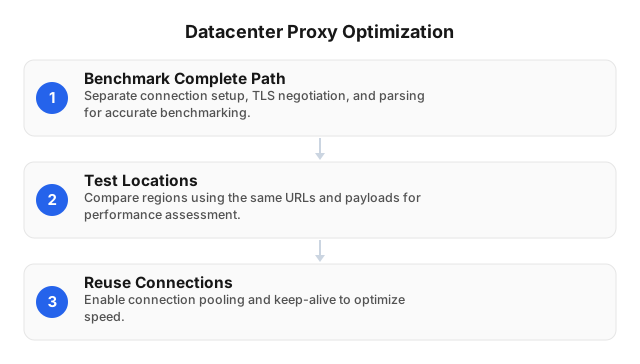
Improve collection speed by testing shorter network paths, connection reuse, and controlled increases in concurrency. Measure each change against valid records per second. An isolated latency improvement may not shorten the job if parsing, retries, or target throttling remain the bottleneck. Record failures alongside successful responses.
- Benchmark the complete path. Measure connection setup, TLS negotiation, time to first byte, download, and parsing separately.
- Test locations against actual targets. Use the same URLs, payloads, and worker location. Geographic proximity alone does not establish the fastest route.
- Reuse compatible connections. Test connection pooling and keep-alive. Compare HTTP CONNECT and SOCKS under identical workloads rather than assuming either wins.
- Tune concurrency gradually. Stop adding workers when valid-record output stalls or throttling rises. Honor target terms, rate limits, and retry instructions.
A low proxy price does not guarantee a low collection cost. Include retry traffic and worker time in the calculation.
Scalability Challenges and Solutions
Expand capacity only while accepted output improves within the target’s permitted limits. More workers can generate more retries without producing more records. Set per-domain concurrency limits and distinguish connection failures from target rejections. Pause expansion when retry traffic grows faster than completed collection, then investigate the failure type.
Partition scheduled catalog queues by domain and region. This can prevent one stalled target from occupying all available workers. Track queue age alongside latency to reveal backlogs hidden by fast individual responses.
Keep session-dependent pagination on a consistent IP. Rotate between independent jobs rather than changing addresses mid-session.
On rate-limit responses, honor Retry-After and reduce concurrency instead of immediately switching addresses. Budget bandwidth and worker time against validated, deduplicated records, including failed attempts.
Case Study: Scaling Web Scraping Operations
Use a controlled pilot before expanding a collection job. The e-commerce scenario below is illustrative, not a measured customer deployment. It compares routes using validated price records, elapsed time, and total cost. It does not assume that either proxy type will perform better on the retailer’s pages.
An IT manager collecting permitted public prices separates catalog discovery from scheduled product refreshes. Each queue tracks valid prices, transferred bytes, retries, and target responses. A challenge page counts as a collection failure.
The manager increases datacenter concurrency by target while keeping the URL mix and geography fixed. Expansion stops when valid-record output plateaus or throttling rises.
Residential routing is tested separately where permitted. The decision rests on total cost per validated record, including retries—not attempted requests or advertised connection speed.
Related Reading
Use these guides to extend the test plan beyond a single scraping job. Content delivery requires attention to cache behavior and delivery paths. Broader infrastructure reviews also need workload-specific latency and reliability measurements. Apply each guide to your own targets rather than treating one test result as universal.
FAQ
Evaluate proxy choices against the collection task, target permissions, and billing model. The answers below distinguish available connection capacity from accepted output. Before buying more capacity, check whether failures come from transport, access controls, or parsing. Each cause calls for a different response, not simply more IP addresses.
What are datacenter proxies used for?
Datacenter proxies can support permitted public-data collection, price monitoring, SEO checks, and localization testing. Server-hosted connections can suit repeatable tasks with substantial request volume. Start with a small test on authorized pages. Confirm that the returned content meets your requirements before increasing request volume within published limits.
How fast are datacenter proxies?
Datacenter proxies can provide fast connections, but no universal response time or speed multiplier applies across targets. Server location, routing, protocol, and provider capacity can affect latency. Target processing and retries also affect completion time. Measure time to usable data, since a fast error page does not complete the job.
What are the scalability benefits of datacenter proxies?
Datacenter proxies can expand connection capacity by distributing work across server-hosted IPs. That capacity does not increase a target’s permitted request rate or guarantee accepted responses. Scale against successfully parsed records per second. Stop adding concurrency when throttling, retries, or processing queues cancel out the gain in useful output.
How do datacenter proxies compare to residential proxies?
Datacenter proxies use hosting-network addresses, while residential proxies use addresses associated with residential internet connections. Neither type guarantees faster completed jobs or lower costs on every target. Compare both using the same workload. Include bandwidth, retries, parsing failures, and session requirements when calculating cost per usable record.
What are common challenges with datacenter proxies?
Datacenter proxy workloads can encounter blocking, throttling, shared-IP reputation issues, and connection bottlenecks. Changing addresses cannot fix every failure because access rules, session state, and target capacity still apply. Classify failures before adding capacity. Reduce rates for throttling, preserve required sessions, and pause collection when access is disallowed.
This article was written by the EProxies team and reviewed against our editorial quality standards before publishing.