
Datacenter vs Residential Proxies for CDNs: 2026
TL;DR: Datacenter proxies are better for most CDN optimization work because stable endpoints, low variance, and higher concurrency produce repeatable cache, latency, and origin-health measurements. Add residential proxies when delivery depends on country, city, ISP, ASN, or consumer-IP classification; a practical workflow uses datacenter routes continuously and launches sticky residential tests only when an anomaly appears geographic or network-specific.
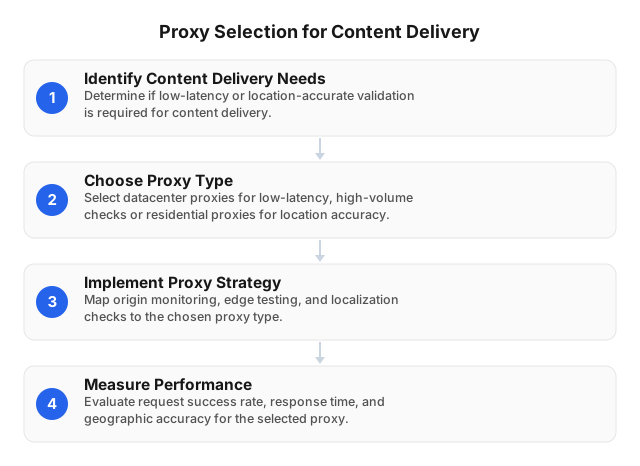
Which Proxy Type Fits Each CDN Task?
“CDN optimization” covers two different jobs: tuning infrastructure and validating user delivery. Datacenter proxies fit the first; residential proxies fit the second.
| CDN task | Better default | Reason |
|---|---|---|
| Cache-hit and cache-miss validation | Datacenter | Stable source IP and repeatable request path |
| Origin-health monitoring | Datacenter | Lower timing variance and economical frequent checks |
| Cache warming | Datacenter | Higher concurrency and predictable throughput |
| TLS, redirect, and certificate checks | Datacenter | Easy endpoint reuse and log correlation |
| Controlled load testing | Datacenter | Better capacity and cost control |
| Country or city localization | Residential | Consumer geolocation can affect content and routing |
| ISP- or ASN-specific incident reproduction | Residential | Tests the network class affected by users |
| Consumer-path edge selection | Residential | Residential ASNs may reach different CDN points of presence |
| Bot or hosting-IP treatment | Residential | Some sites treat datacenter ranges differently |
| Login, checkout, or signed-URL flow | Sticky residential when location matters | A fixed IP preserves transaction continuity |
Neither route produces a universally “true” latency number. A datacenter route offers experimental control; a residential route offers a closer approximation of a selected consumer network.
What a Proxy Changes in a CDN Measurement
A proxy inserts another network segment between the test worker and the CDN. Five properties can change the result:
- Location: The proxy’s country and city can determine localization and edge selection.
- ASN: Two IPs in the same city but on different networks may use different peering paths.
- IP classification: Targets may challenge, throttle, or redirect hosting ranges differently from consumer ranges.
- Session policy: Rotating the IP during authentication or signed-asset retrieval can invalidate state.
- Protocol support: An HTTP
CONNECTtunnel normally measures TCP-based HTTP/1.1 or HTTP/2, not QUIC over UDP. Verify UDP support before claiming an HTTP/3 benchmark.
Do not report total proxied response time as CDN latency. Instrument these phases separately:
- Proxy connection and authentication
- DNS resolution location
- TCP connection setup
- TLS negotiation
- Time to first byte
- Body-transfer time
- Retries and retry-adjusted completion time
Run a direct control from the same worker, but do not simply subtract direct time from proxy time. Direct and proxied requests may terminate at different CDN edges. Capture the serving point of presence through response headers, CDN logs, or a diagnostic endpoint.
Datacenter Proxies for Baselines and Controlled Tests
Datacenter proxies use addresses hosted in server infrastructure. Fixed endpoints and predictable connection reuse make them the default for checks that run every minute or require hundreds of concurrent connections.
A useful baseline layout assigns one static endpoint to each major delivery region—for example, Virginia, Frankfurt, Singapore, São Paulo, and Sydney. Each route requests the same versioned asset and HTML endpoint with identical headers, timeouts, and connection settings. Fixed source addresses also simplify firewall allowlisting and matching proxy requests to CDN logs.
Use datacenter proxies for:
- Edge and origin availability
- Cache warming and purge verification
- Cache-key testing
- Static-object throughput
- Redirect-chain monitoring
- TLS version and certificate checks
- Controlled concurrency
- Regional p50, p95, and error-rate baselines
Their limitation is representativeness. A CDN can route a server ASN differently from a consumer ASN, and the destination may apply stricter controls to hosting ranges. A successful Frankfurt datacenter check confirms that one server-originated path works; it does not confirm delivery through a German broadband provider.
Residential Proxies for Geographic and ISP Validation
Residential proxies use addresses associated with consumer ISPs. Their value comes from source-network realism rather than raw throughput.
Use them to validate:
- Country- and city-specific redirects
- Currency, language, catalog, and consent variants
- ISP- or ASN-specific latency
- Consumer-path CDN edge selection
- Access failures limited to hosting-provider IPs
- GeoIP database errors
- Incidents reported by users in one market
Choose rotation deliberately. Rotating IPs are appropriate for sampling 20 independent paths across a country. Sticky sessions are required for multi-request transactions such as login, consent, cart, checkout, manifest retrieval, and signed media downloads; retain one IP until the workflow completes.
Residential measurements usually show wider latency distributions because they include ISP routing, peering, and pool-location variance. They are therefore inefficient for continuous high-volume load generation but effective for confirming whether an optimization reaches users on a specific network.
For differences in address source, rotation, acceptance, and capacity, see Residential or Datacenter Proxies? 2026 Guide.
A Reproducible CDN Optimization Workflow
1. Define three representative endpoints
Testing every URL creates noise. Start with:
| Endpoint | What it isolates |
|---|---|
| Versioned 1–5 MB static object | Cache-hit throughput and transfer stability |
| Cacheable HTML page | Localization, Vary behavior, and stale content |
| Dynamic API endpoint | Origin latency, authentication, and retries |
Include a lightweight diagnostic endpoint that returns the detected country, request ID, protocol, and serving edge when the CDN supports it.
2. Set the sample size before testing
Use at least 200 successful requests per route to compare p95 latency. Use 1,000 or more for a meaningful p99 estimate; with only 100 samples, p99 is effectively the slowest observation and is highly unstable.
Warm and cold cache tests must be separate. For cold-cache measurements, purge a dedicated test object or vary a controlled cache-busting key that the CDN configuration recognizes. Random query strings can bypass caching entirely and produce an origin benchmark instead of a CDN benchmark.
3. Validate content, not only HTTP status
A 200 OK response can contain a challenge page, fallback locale, or stale release. Record:
- Expected status code
- Payload size and content hash
- Regional or release marker
Age,Cache-Control,ETag, andLast-Modified- CDN-specific cache and edge headers
- Redirect destination
- Challenge-page signature
- Serving point of presence
Keep CDN-specific cache labels separate from the standard caching rules defined by RFC 9111. A provider header labeled “hit” does not explain whether the object was revalidated, served stale, or retrieved from an upper-tier cache.
4. Hold comparison variables constant
Use the same URL, method, headers, timeout, body limit, connection-reuse policy, request interval, and retry count. Report p50, p95, p99, first-attempt success, validated-content success, and retry-adjusted completion time.
A route returning in 500 ms with a 10% retry rate can deliver a worse transaction experience than a stable one-second route. Keep first-attempt latency separate from completion time after retries.
5. Escalate only the relevant anomalies
Launch residential validation when a datacenter monitor detects:
- A new redirect or browser challenge
- Incorrect language, currency, catalog, or consent text
- A content-hash mismatch isolated to one region
- A cache miss limited to one market
- Latency concentrated in one country or ASN
- A user incident tied to a specific ISP
For a generic timeout, retry through a second datacenter route first. For wrong localization or suspected ASN routing, go directly to a residential route in the affected market.
Worked Case Study: Isolating ISP-Specific Misrouting
The following example dataset shows how the two proxy types answer different parts of one incident; the values are illustrative rather than a universal performance benchmark.
Users on one Sydney broadband network report a French catalog and slow page loads. Continuous datacenter monitoring shows no global failure, so the test uses the same cacheable HTML URL, headers, 10-second timeout, and 200 requests per route.
| Route | Serving edge | p95 TTFB | Wrong locale | Validated success |
|---|---|---|---|---|
| Singapore datacenter | Singapore | 310 ms | 0/200 | 100% |
| Sydney datacenter | Sydney | 185 ms | 0/200 | 100% |
| Sydney residential, affected ASN | Singapore | 1,420 ms | 34/200 | 83% |
| Sydney residential, second ASN | Sydney | 240 ms | 0/200 | 99.5% |
The datacenter routes establish that the object, origin, and Sydney edge are healthy. The residential comparison isolates the problem to one ASN: its requests reach Singapore, and 17% receive the wrong locale. CDN logs then provide the actionable evidence—source ASN, selected edge, cache status, and geolocation result—needed to correct traffic steering and GeoIP mapping.
After the configuration change, repeat the same 200-request affected-ASN test rather than comparing against an unrelated route. A sensible acceptance gate for this case is zero wrong-locale responses, at least 99% validated success, and p95 TTFB below 500 ms.
Capacity, Location, and Cost Planning
EProxies provides 72M+ residential IPs across 195+ countries, with country, city, and ASN targeting. HTTP(S) and SOCKS5 support covers browser automation, command-line probes, and applications that require proxy-level TCP connections; confirm UDP behavior separately before testing HTTP/3.
Published service availability is 98.2% uptime, backed by a 99.9% uptime SLA. These figures describe service operation and contractual commitment, not whether a particular target accepts every IP. Pilot the exact domains, locations, ASNs, protocols, and concurrency levels required by the monitoring plan.
Available pricing includes:
- Pay-as-you-go residential traffic from $0.25/GB
- Tiered residential pricing of approximately $0.73/GB at 300GB
- ISP SOCKS5 proxies from $0.95/IP
- Unlimited plans from $79/month
Calculate transferred data before scheduling full-object tests. Retrieving a 5 MB asset 10,000 times transfers approximately 50 GB before headers, retries, or protocol overhead. For cache-state checks, a small dedicated object can provide the required headers without repeatedly transferring a production video or software package.
Use HEAD only after confirming that the origin handles it like GET; some stacks generate different headers or skip normal cache behavior. A bounded range request is safer when the CDN and origin implement byte ranges consistently.
For plan comparison and break-even calculations, see Understanding Proxy Cost-Benefit: 2026 IT Guide. Select locations from traffic, revenue, and incident records rather than country count alone; Best Countries to Source Residential Proxies in 2026 explains market-selection criteria.
Security and Operational Controls
Proxy access does not bypass authentication, website terms, robots policies, privacy duties, or applicable law. Restrict monitoring to approved domains, methods, ports, and request rates.
Apply these controls:
- Store credentials in a secrets manager.
- Remove proxy URLs and authorization headers from logs.
- Restrict egress to approved destinations.
- Set per-domain concurrency and rate limits.
- Isolate monitoring workers from administration networks.
- Rotate credentials on a defined schedule.
- Retain request IDs, edge IDs, and timing data without unnecessary personal information.
Fixed datacenter nodes support IP allowlists. Rotating residential pools require scoped credentials, destination restrictions, short credential lifetimes, and alerts for unexpected bandwidth consumption.
FAQ
What is the main difference between residential and datacenter proxies?
Datacenter proxies originate from server-hosted address space, while residential proxies use IPs associated with consumer ISPs. Datacenter routes prioritize repeatability and concurrency; residential routes reproduce geographic, ISP, ASN, and consumer-IP conditions.
Which proxy type is faster for CDN testing?
Datacenter proxies are usually faster and less variable because they run on server infrastructure with predictable connectivity. Compare routes under identical location, payload, timeout, connection-reuse, and retry settings because edge selection can outweigh the proxy category itself.
Which proxy type is better for CDN optimization?
Datacenter proxies are better for routine CDN optimization, including cache validation, origin-health monitoring, latency baselines, cache warming, and controlled load. Residential proxies are better for optimizing delivery by country, city, ISP, or ASN where routing, localization, or access controls depend on the source IP. Use datacenter proxies for continuous measurement and residential proxies for targeted user-path validation.
How should benchmark success rates be interpreted?
Define success as the expected status plus validated content, not merely any HTTP response. Compare percentages only when destination, location, payload, timeout, retry policy, and concurrency are identical; otherwise the result mixes proxy performance with test-design differences.
How do residential proxy costs affect CDN monitoring?
Residential plans often meter transferred data, so full-page, video, and software-download tests consume budget quickly. Estimate usage as response bytes × requests per run × monthly runs, then add dependent assets, retries, and protocol overhead.
Should CDN tests use rotating or sticky sessions?
Use rotating sessions to sample independent IPs and network paths. Use sticky sessions for authentication, carts, consent flows, signed URLs, and multi-request pages, retaining one IP until the transaction finishes.
How can administrators separate proxy delay from CDN delay?
Record proxy setup, DNS, TCP, TLS, TTFB, transfer time, and retries as separate fields, then compare direct and proxied controls from the same worker. Capture the serving edge because the direct and proxied requests may terminate at different CDN points of presence.
How do proxies impact website accessibility?
Proxies can test operational reachability across countries and ISPs or reproduce failures caused by routing, regional restrictions, and IP classification. They can also reduce reachability through extra latency, failed routes, or destination blocking. Proxies do not test disability accessibility; semantic markup, keyboard operation, text alternatives, contrast, and assistive-technology support require a separate program.
This article was written by the EProxies team and reviewed against our editorial quality standards before publishing.