
Choosing ISPs for Streaming Optimization in 2026
TL;DR: The best ISP for streaming is usually a fiber provider with stable evening speeds, low packet loss, no restrictive data cap, and enough capacity for every active device. Start with 100 Mbps for a small household and consider 300 Mbps when several 4K streams, calls, downloads, or cloud backups run together. If fiber is unavailable, test local cable, municipal, cooperative, and fixed-wireless services during peak hours rather than trusting advertised maximums.
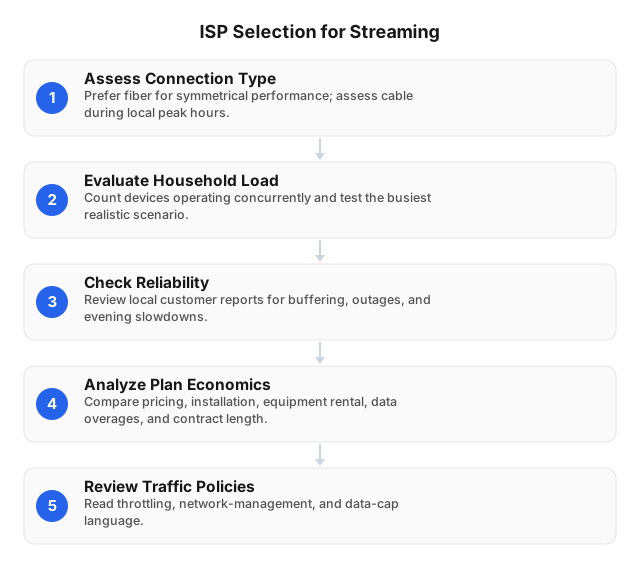
What Makes an ISP Good for Streaming?
A fast plan can still buffer if its performance drops between 7 p.m. and 11 p.m. Compare providers using sustained throughput, packet loss, jitter, latency, data policy, and total cost.
Use these targets as a practical screening test:
- Measured speed: At least 80% of the plan rate on a wired connection during peak hours
- Packet loss: Below 1%; repeated loss above 1% can cause stalls or quality shifts
- Jitter: Below 30 milliseconds for live video, calls, and cloud gaming
- Latency: Below 50 milliseconds to nearby test servers is a useful target
- Data allowance: Unlimited, or high enough for monthly 4K viewing
- Router access: Bridge mode, customer-owned router support, and configurable QoS
- Pricing: Compare the regular rate, not only the 6- or 12-month promotion
Latency has less effect on a buffered movie than on live sports or cloud gaming. Packet loss and unstable throughput can hurt both. A 500 Mbps line that falls to 20 Mbps each evening may perform worse than a steady 100 Mbps fiber connection.
Streaming Speed Requirements
Streaming services use adaptive bitrate encoding. They lower the picture quality when available bandwidth falls, then raise it after the connection stabilizes. Your plan therefore needs both adequate speed and spare capacity.
| Activity | Typical bandwidth per device | Practical allowance |
|---|---|---|
| SD video | 3 Mbps | 4–5 Mbps |
| HD video | 5–10 Mbps | 10–15 Mbps |
| 4K video | 15–25 Mbps | 25–35 Mbps |
| HD video call | 3–6 Mbps down and up | 8–10 Mbps each way |
| 4K livestream upload | 10–20 Mbps up | 20–30 Mbps up |
| Cloud gaming | 15–35 Mbps | Low latency and jitter also required |
Add the requirements for simultaneous activities, then reserve 25% to 50% for Wi-Fi loss, software updates, and bitrate spikes.
For example, two 4K streams may use 50 Mbps. Add an HD call at 10 Mbps and ordinary browsing at 10 Mbps. The combined load is about 70 Mbps, so a stable 100–150 Mbps plan should work. A 300 Mbps plan gives more room for game downloads, security-camera uploads, and additional viewers.
More speed does not always fix buffering. If a wired test delivers the expected rate but the television does not, investigate Wi-Fi placement, interference, or an overloaded router first.
How Connection Types Compare
Fiber is usually the strongest option because it often provides similar download and upload rates. Cable is the next-best wired choice, but users may share local capacity. Fixed wireless depends more heavily on tower load, signal quality, and weather.
| ISP connection | Best use | Main risk | What to verify |
|---|---|---|---|
| Fiber | Several 4K streams, live video, large uploads | Limited address coverage | Symmetric speed, installation time, cap policy |
| Cable | Most households without fiber | Evening node congestion and low upload speed | Peak-hour tests, upload rate, equipment fee |
| Municipal or cooperative fiber | Homes within a local service area | Restricted coverage or slower repairs | Service boundary, support hours, router freedom |
| Fixed wireless | Rural homes or wired-service gaps | Signal changes and tower congestion | Line of sight, indoor test period, cap and throttling rules |
| DSL | One or two light streams | Distance-sensitive speed and low capacity | Actual address estimate, not “up to” speed |
| Satellite | Remote locations with no terrestrial service | Higher latency, caps, and weather effects | Priority-data allowance and congestion policy |
Avoid choosing by connection label alone. A well-managed regional cable network may outperform an oversubscribed fiber service at a specific address.
A Concrete ISP Comparison Method
Create a scorecard for every provider serving your address. This prevents a low introductory price or oversized speed claim from dominating the decision.
Suggested weighting:
- Peak-hour consistency — 30%: Wired speed, packet loss, jitter, and buffering between 7 p.m. and 11 p.m.
- Plan capacity — 20%: Enough download and upload bandwidth for the household’s busiest hour.
- Data policy — 15%: Monthly allowance, overage price, throttling threshold, and unlimited-data fee.
- Total two-year cost — 15%: Installation, equipment, regular monthly price, taxes, and cancellation fees.
- Reliability — 10%: Local outage frequency, repair times, and backup-power practices.
- Router control — 10%: Bridge mode, IPv6, customer equipment, QoS, and Smart Queue Management support.
Ask each ISP for its broadband label or written plan details. Record the promotional price and the rate after that promotion ends. A $50 plan that rises to $85 after 12 months costs $1,620 over two years before equipment or taxes.
Neighborhood evidence is more useful than a national ranking. Reviews from another city may describe a different cable node, fiber build, wireless tower, or support team.
Data Caps and Streaming Costs
Video can consume a monthly allowance quickly. Actual usage varies by codec, resolution, frame rate, and platform, but these estimates are useful for plan comparisons:
- HD video: Roughly 1.5–3 GB per hour
- 4K video: Roughly 7–16 GB per hour
- Two hours of 4K daily: About 420–960 GB per month for one screen
- Two 4K screens at that rate: About 840 GB–1.9 TB per month
Check whether exceeding the cap triggers an overage charge, reduced speed, or an automatic unlimited-data upgrade. Also count game downloads, operating-system updates, cloud backups, and security cameras.
Advanced Features That Improve Streaming
Symmetric upload speed
Uploads can interfere with downloads when cloud backups, video calls, or cameras saturate a slow upstream link. A cable plan with 500 Mbps down but only 10 Mbps up may suffer latency spikes during a large backup. Fiber plans with 100/100 Mbps or 300/300 Mbps avoid that imbalance.
Smart Queue Management
Smart Queue Management limits oversized queues inside the router. This reduces bufferbloat, which causes latency to jump while another device downloads or uploads data. Common implementations include FQ-CoDel and CAKE.
Run a latency-under-load test before and after enabling the feature. If idle latency is 20 ms but rises to 200 ms during an upload, queue management can make a visible difference to live streams and calls.
Bridge mode and customer-owned routers
Bridge mode lets a personal router handle Wi-Fi, DNS, firewall rules, and traffic queues. It also avoids double NAT, which can complicate game consoles, remote access, and some casting devices.
Confirm compatibility before buying equipment. Some ISPs require their gateway for voice service, authentication, or technical support.
IPv6 and CDN routing
IPv6 is not required for streaming, but native support avoids unnecessary translation on compatible services. Routing also matters: a generic speed test may be fast while the path to a specific video platform is congested. Test the services you use during the evening, not only the ISP’s preferred speed-test server.
Lesser-Known ISPs Worth Testing
Municipal networks, electric cooperatives, independent fiber builders, regional cable operators, and local fixed-wireless providers can be excellent streaming ISPs. They may offer symmetric service, simpler prices, or less congested local infrastructure.
Evaluate each type with specific questions:
| Provider type | Potential advantage | Main checks |
|---|---|---|
| Municipal broadband | Local infrastructure and direct accountability | Eligibility, expansion schedule, taxpayer or utility surcharges |
| Electric or telephone cooperative | Fiber builds in underserved areas | Membership fee, installation wait, repair coverage |
| Independent regional fiber | Symmetric speeds and modern equipment | Promotion expiry, support hours, contract term |
| Local cable operator | Broader rural coverage than fiber | Shared-node congestion, upload speed, data cap |
| Fixed-wireless ISP | Faster deployment outside wired areas | Roof equipment, line of sight, tower load, weather sensitivity |
Ask for a test period or month-to-month service if available. During that period, run wired tests at 8 a.m., 3 p.m., and 8 p.m. for at least seven days. Record minimum speed, median latency, jitter, packet loss, and outage duration.
Optimize the Home Network Before Upgrading
An ISP upgrade cannot repair weak Wi-Fi in a distant room. Isolate the fault before paying for a larger plan.
- Test by Ethernet. Connect a laptop directly to the gateway and test during the evening.
- Compare Wi-Fi results. Repeat beside the router and at the streaming device.
- Wire fixed equipment. Use Ethernet for televisions, consoles, and media boxes where practical.
- Move the router. Place it in an open, central location rather than inside a cabinet or behind a television.
- Use the right band. A 5 GHz or 6 GHz band offers more capacity at short range; 2.4 GHz travels farther but faces more interference.
- Update firmware. Router updates can fix stability, security, and device-compatibility problems.
- Enable queue management. Configure QoS or Smart Queue Management if uploads cause latency spikes.
- Remove double NAT. Put either the ISP gateway or the personal router into bridge or access-point mode.
- Retest for seven evenings. Save timestamps and screenshots for the ISP’s support team.
If Ethernet remains stable while Wi-Fi buffers, replace or reposition the router. If both connections slow down at the same hours, the ISP or local access network is the likely bottleneck.
Using Proxies for Streaming Tests
A proxy does not increase the bandwidth supplied by an ISP. It adds another route and server, so it may increase latency. Proxies are useful for authorized regional availability checks, application testing, and measuring how content delivery changes by location.
Residential IPs are more suitable than datacenter IPs when a test must resemble a normal household connection. For selection criteria, see How to Choose the Right Proxy for Streaming and Proxy Type Selection by Task: 2026 SEO & Scraping Guide.
EProxies provides access to 72M+ residential IPs across 195+ countries. The network supports HTTP(S) and SOCKS5, reports 98.2% uptime, and is backed by a 99.9% uptime SLA. Options include pay-as-you-go residential traffic from $0.25/GB, volume pricing around $0.73/GB at 300GB, ISP SOCKS5 from $0.95/IP, and unlimited plans from $79 per month.
Use proxies only where the platform, account agreement, and applicable law permit them.
FAQ
What is the best ISP for streaming?
The best ISP for streaming is a local fiber provider that delivers stable evening throughput, low packet loss, sufficient upload speed, and unlimited data. A 100 Mbps plan can support a small household, while 300 Mbps is a safer target for several 4K streams, calls, backups, and downloads. If fiber is unavailable, choose the cable or fixed-wireless provider with the best address-level peak-hour results.
How much internet speed is needed for streaming?
Allow 3 Mbps for SD, 5–10 Mbps for HD, and 15–25 Mbps for each 4K stream. Add all simultaneous activities, then reserve 25% to 50% for Wi-Fi loss and traffic spikes. Most small households can use 100 Mbps, while busier homes often benefit from 300 Mbps.
What features should I look for in an ISP for streaming?
Look for stable peak-hour speed, packet loss below 1%, low jitter, adequate upload capacity, and no restrictive data cap. Also check the regular price, equipment fee, contract term, bridge mode, IPv6, and customer-owned router policy. Symmetric fiber service is preferable when livestreams, video calls, or cloud backups run often.
How can I optimize my home network for streaming?
Connect the main television or media box by Ethernet and place the router in an open, central location. Enable Smart Queue Management if large uploads cause latency spikes, and avoid double NAT by using bridge or access-point mode. Compare wired and Wi-Fi tests before upgrading the ISP plan.
Are there any lesser-known ISPs good for streaming?
Yes. Municipal broadband networks, electric cooperatives, independent regional fiber providers, local cable operators, and fixed-wireless ISPs can provide strong streaming performance. Favor services with symmetric speeds, unlimited data, and stable evening tests, then verify installation costs, repair times, router restrictions, and service boundaries.
Do data caps matter for streaming?
Yes, especially for daily 4K viewing. One screen used for two hours of 4K video per day can consume roughly 420–960 GB each month. Compare the cap, overage charge, throttling threshold, and unlimited-data price before signing.
How can I tell whether an ISP slows down during peak streaming hours?
Run wired tests at the same times for at least seven days, including several tests between 7 p.m. and 11 p.m. Track minimum throughput, latency, jitter, packet loss, and actual buffering. Repeated wired slowdowns during those hours point to ISP congestion rather than a Wi-Fi problem.
This article was written by the EProxies team and reviewed against our editorial quality standards before publishing.